Absence, time andshift planning onone calendar.
Registrations valorize straight into gross pay lines, so nothing is retyped before a run. The balance a manager sees is the balance payroll will use.
Sent only when you approveApprove
Overview
Who is in, who is out, and why.
The Workforce front page for Denmark: who clocked in today, who is sick or on holiday, working-time flags, what waits for your approval, and the absence calendar for the next 14 days.
- 1Out today: 2 sick, 1 on holiday.
- 3Public holidays from the Danish calendar, half days included.
 1234
1234- 23 people breaching working-time rules, on the front page.
- 4The next 14 days: who is away, and when.
Absence
Modelled for Danish rules, including parental leave.
Absence types are not a free-text field. Holiday, sickness, child sick days and parental leave each behave the way the rules say they behave.
Absence
Who is sick, who is waiting for an answer, and what it costs.
 123
123- 1Five requests waiting. Approve, decline or delete, right here.
- 2Most short-term sick days, highest first.
- 3Long-term cases tracked as reimbursement, not as a pattern.
Absence
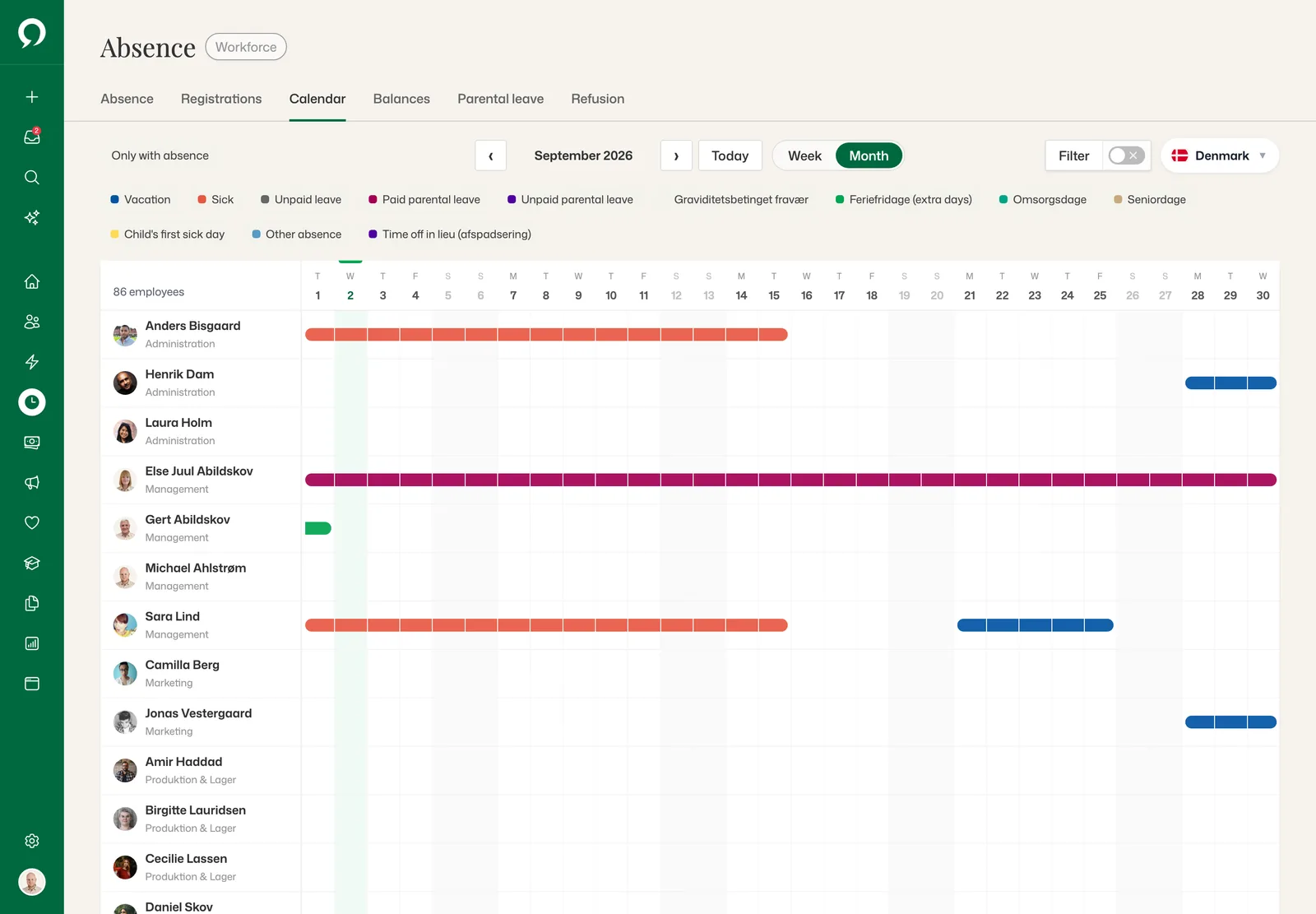
The whole month, every absence type on its own.
 123
123- 1Holiday, sickness, parental leave, feriefridage: each type its own colour.
- 2Week or month, and only the people with absence if you like.
- 3Sick leave and holiday on one row, each in its own colour.
Absence
Parental leave gets its own screen, for weeks, splits and transfers.
 123
123- 1Calculated under the Danish rules for children born from 2 Aug 2022.
- 2Pregnancy leave, the birth, then 22 weeks: the split on a timeline.
- 3Next one back at work: 14 September.
Absence
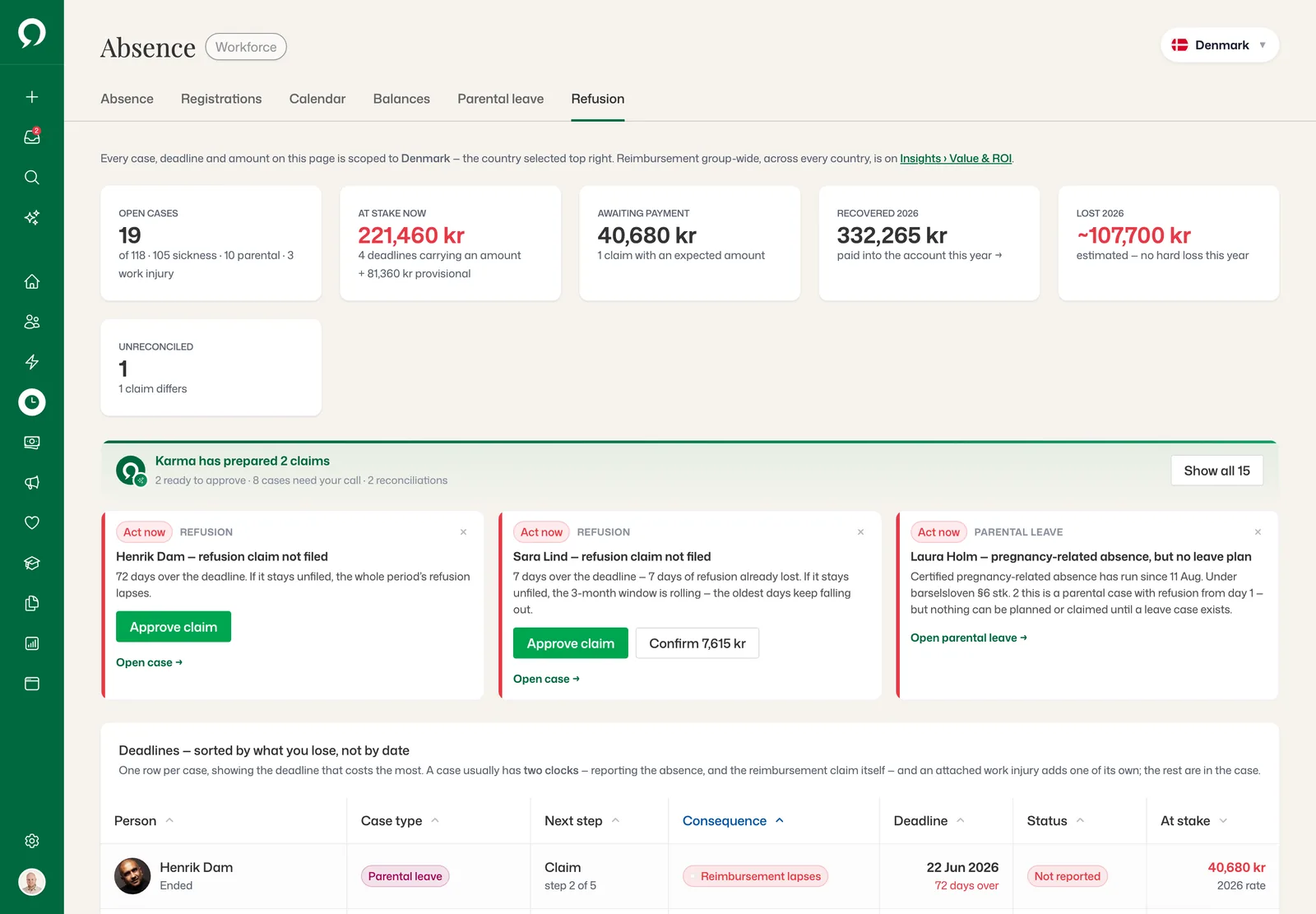
Reimbursement that would otherwise lapse, caught before the deadline.
 123
123- KarmaTwo claims prepared and ready to approve.
- 1221,460 kr at stake in deadlines that carry an amount.
- 272 days over the deadline. One click files the claim.
- 3Deadlines sorted by what you lose, not by date.
Time tracking
Hours that become pay lines without being retyped.
Time is registered against work schedules and projects, next to the absence that competes with it. When a pay run opens, the registrations are already valorized into gross lines with the right supplements applied.
- Work schedules per employee, with deviations shown against plan
- Project and cost-centre tracking on the registration
- Supplements calculated from the collective agreement, not by hand
- Balances for holiday, overtime and time off in lieu, live
 12
12- 1One person over 48 hours a week, checked against the EU directive.
- KarmaSofie is over 48 hours this week. Flagged, not hidden.
- 211-hour rest broken: out 23:10, back 07:30.
Registrations
Corrected before the run locks the period.
Hours, absence and mileage are approved in one queue. Once approved, the entries lock and reach payroll as gross lines — no export, no retyping.
- Requests, approvals and rejections logged on the employee record
- Balances recalculated as registrations land, not overnight
- The team calendar filtered to what a manager may see
 1234
1234- 1Once approved, entries lock and flow through to payroll.
- 2136 waiting: hours, absence and mileage in one queue.
- 3Approve line by line before the run locks the period.
- 4A work-time report or a CSV when someone asks.
Shift planning
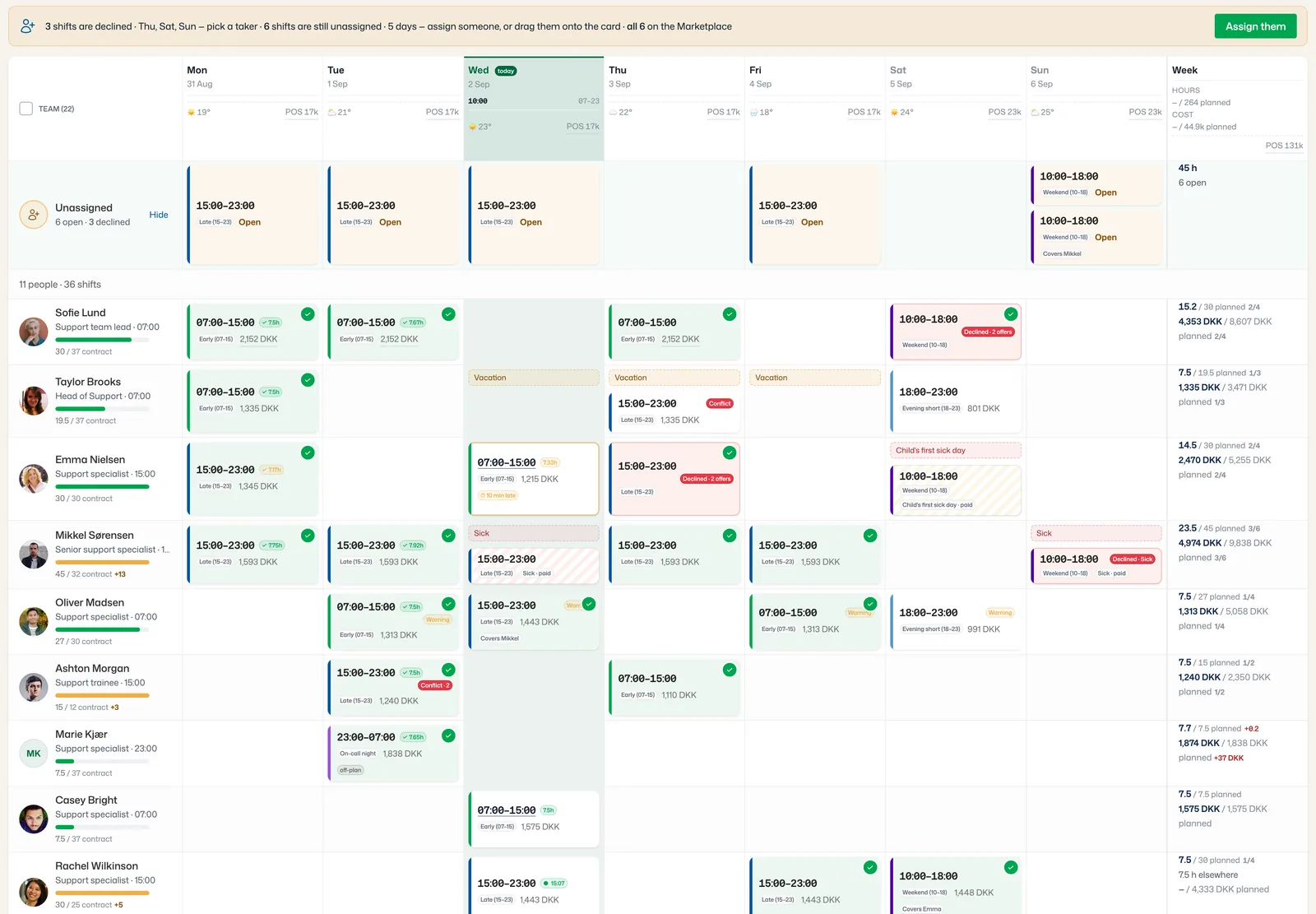
The roster lives in the same calendar.
Shift planning is part of Workforce: the week’s shifts sit next to absence and registered time, so a sick day opens a gap on the roster and a covered shift lands in payroll with its supplements.
- Open and declined shifts gathered in one lane, before anyone asks
- One click puts open shifts on the Marketplace
- Agreement rules and cost on every shift while you plan
What is in it
Workforce, in full.
See it on your own data.
A 30-minute walkthrough with someone who knows the module — and your org structure, not a demo tenant.