Denmark
Week 6- Integrations tested
- Employees and balances reconciled
- Login works
- Training done
- Communication ready
- First pay run known
- Fallback date set
GO · first pay run → sign-off
We do not use cookies for advertising, and we never sell data. If you say yes, we can see which company a visit comes from – never who you are – and which pages were of interest, so we are better prepared when you get in touch. The network address is deleted straight away. “Accept all” also switches on statistics with Vercel Analytics (USA), without cookies.
Whatever you choose, you are welcome at Komma. Read more about your data
Remembers the choice you make here, so we do not ask again on every page.
Anonymous page count on the server – no cookies, nothing stored on your device
| Name | Purpose | Duration | Provider |
|---|---|---|---|
| komma-consent | Remembers your choice (localStorage) | 12 months | Komma |
More detailed statistics with Vercel Analytics, without cookies, such as browser and type of device, shown to us only as totals. It shows us what is useful and what is not.
| Name | Purpose | Duration | Provider |
|---|---|---|---|
| Vercel Web Analytics | Page statistics without cookies: pages, referrer, country and device, shown to us only as totals | Nothing stored in your browser | Vercel Inc. (USA) |
| komma-src | Remembers which campaign or site brought you here, so we know which channels work. Kept when Statistics or Company recognition is on (sessionStorage) | Until you close the tab | Komma |
Shows us which companies visit and which pages they read, so our sales team knows who is interested. We see the company, never you as a person.
| Name | Purpose | Duration | Provider |
|---|---|---|---|
| komma-sid | A random visit id that ties the pages of one visit together (sessionStorage) | Until you close the tab | Komma |
| Company lookup | Your network address is looked up in a local database (IPinfo Lite) on our server in the EU, in public DNS and in a copy of RIPE NCC's public register of who IP addresses are assigned to, which also sits on our server, to find the organisation that owns the network, and is then discarded | The address is discarded at once | Komma (server in the EU) |
| Company and pages | The company name, the pages viewed, time and source are kept in our database | 90 days | Upstash (EU, Frankfurt) |
| Note in our CRM | Companies we already know, or that show clear interest, get a note or a lead in our CRM | As long as the company is in our CRM | Pipedrive (EU) |
Live in weeks, not months. One structured plan from kickoff to your first pay run, sign-offs at every step and a fixed contact at Komma the whole way — so you always know what happens next.
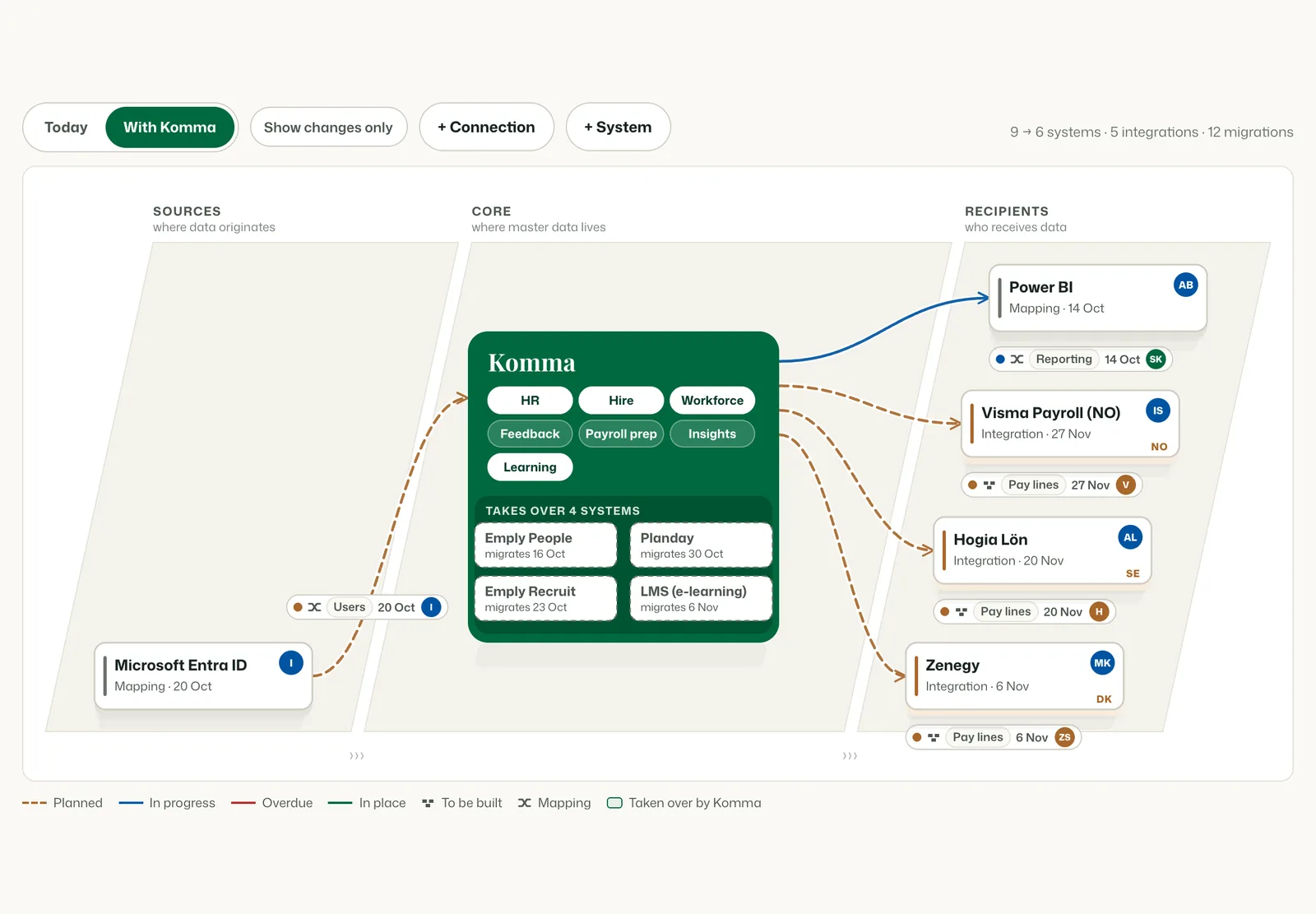
Point at a system to see what travels to and from Komma.
Six meetings
Every meeting has a purpose and something you leave with. Nothing moves to the next step until the one before it is signed off.
Your implementation portal
From kickoff, every customer has their own implementation portal: the plan per country, what gets set up, who owns each task, and every change logged. Your people log in with their own link.
The plan
 1234
1234Setup
 123
123Migration & integrations
 1234
1234Activity
 123
123Migration
Employees, contracts, documents and absence balances come across country by country — checked before they load, and signed off against the source after.
Payroll, per country
Each country keeps the payroll system it runs today. Komma’s pay items are mapped once to that system’s pay codes, and the migration is counted and reconciled per country.
Example company
| In Komma | Pay code in Zenegy |
|---|---|
| Monthly salary | 1010Månedsløn |
| Normal hours | 1011Normaltimer |
| Overtime 50 % | 1150Overarbejde |
| Holiday | 1210Ferie |
| Sick | 1410Sygdom |
| Mileage (km) | 1061Kørsel |
Example company
| In Komma | Pay code in Hogia |
|---|---|
| Monthly salary | Månadslön |
| Hourly pay | Timlön |
| Overtime | Övertid |
| Holiday | Semester |
| Sick | Sjuklön |
| Mileage (km) | Milersättning |
Example company
| In Komma | Pay code in Visma Payroll |
|---|---|
| Monthly salary | Fastlønn |
| Hourly pay | Timelønn |
| Overtime 50 % | Overtid 50 % |
| Holiday | Ferie |
| Sick | Sykepenger |
| Mileage (km) | Kjøregodtgjørelse |
Gross lines only. Holiday pay and tax are calculated in the payroll system.
Go-live
Each country goes live on its own go/no-go. If one check is not green, the country moves to its fallback date — the others go ahead.
GO · first pay run → sign-off
GO · first pay run → sign-off
GO · first pay run → sign-off
Hypercare
A 30-minute walkthrough with someone who knows the module — and a first sketch of your plan, country by country.