Komma owns gross.Your engineowns net.
We build and validate the gross pay lines, then hand them over. Errors surface before the run rather than in the reconciliation afterwards — and you do not change payroll provider to use Komma.
Nothing is sent until the run is approvedApprove
Pay run
Validation before the run, not reconciliation after it.
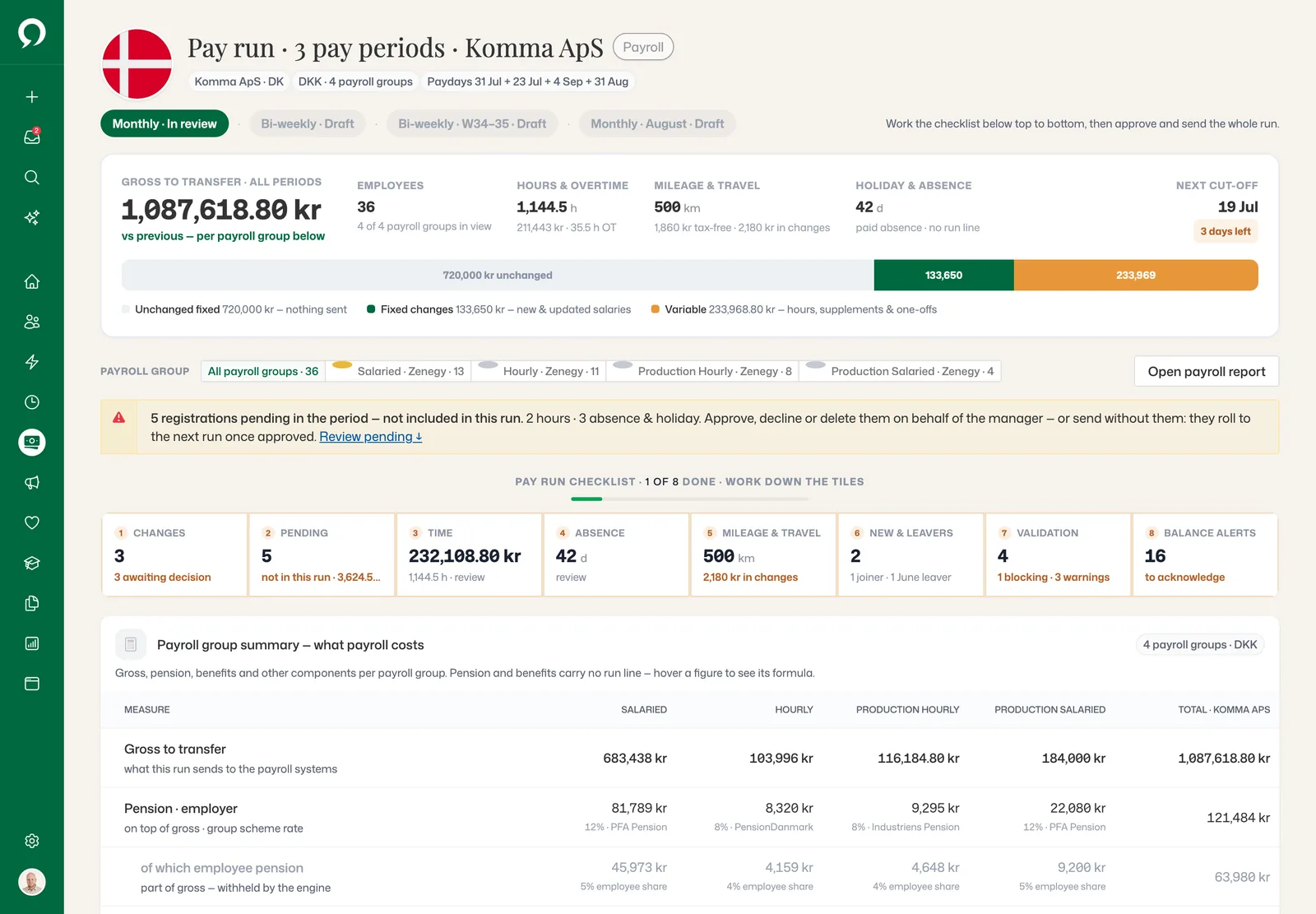
A pay run opens against a period, pulls the registrations already valorized by Workforce, and validates every line before anything is approved. Blocking errors stop the run; warnings point at the employee and field they came from.
- 1Gross to transfer for all 3 pay periods, split into unchanged, changed and variable pay.
- 3Employee pension is part of gross. The engine withholds it.
 123
123- 2Five registrations still pending: approve them on the manager’s behalf, or send without them.
- KarmaOne blocking issue, found in the eight checks, stops the run before your payroll engine sees it.
The pay run
From the first change to the payroll system.
Scroll through a run the way a payroll officer works it: changes decided, hours approved, the approval flow signed, and the approved gross handed over.
Step 1
Every change since the last run, decided line by line.
 123
123- 1Before and now, side by side, for every change since June.
- 2Approve and it joins this run. Reject and it stays out.
- 3A raise from 1 August waits for the August run.
Step 2
Hours and supplements, approved before they are paid.
 123
123- 1Hours and absence no manager has approved yet: approve, decline or delete them here.
- 2Anything undecided stays out of every total. The run can still be sent; it rolls to the next one.
- 3Approved hours by pay code, with a check that each rate matches the policy.
Step 3
The right people approve, in the right order.
 123
123- 1Level 1: all must approve. Two have signed; the third is on holiday with no stand-in, so the level waits.
- 2When an approver is away, the stand-in signs instead.
- 3Level 3 opens after level 2, and any one approver is enough.
Step 4
Approved gross, handed to your payroll system.
 123
123- 1The gross to transfer: salaries, hours and supplements, mileage and travel.
- 2Gross per employee and payroll group. Zenegy handles tax, net pay and payslips.
- 3One click sends the 2 groups that are ready. The 2 blocked groups are held back, not sent.
Payroll
From forecast to handoff.
Every legal entity, every payroll group, and the trail each run leaves behind. Once approved, the lines are locked and cannot drift.
Payroll
Every legal entity and the next paydays on one page.
 123
123- 1One card per legal entity: runs, people and what needs attention.
- 2A new pay run opens against a period.
- 3The next paydays forecast, with the reason for every change.
Payroll
Every person’s line: fixed pay, hours, supplements, mileage and absence.
 123
123- 1Amounts stay hidden until you choose to reveal them.
- 2One-offs awaiting approval are kept out of every total.
- 3Pending amounts sit on the person’s line, outside every total.
Payroll
Who ran it and who approved it, for every payroll group, every month.
 123
123- 1Each payroll group names its engine. Here: Zenegy.
- 2July is in review, and you can see who ran it.
- 3Month by month: who approved it, and when it was confirmed.
Structure
Pay groups, codes and bands that outlive a single run.
Pay components and codes are configured once and reused. Groups decide who is paid on which cycle and under which agreement, and pay transparency reads the bands directly from the job structure in Organisation.
- Pay groups with their own cycle, agreement and approvers
- Pay components and codes with history, so old runs stay explainable
- Pay-band placement per level, reported without a separate exercise
- EU Pay Transparency reporting from the live structure
 123
123- 1Reported per legal entity. Under 100 employees, reporting is still voluntary.
- 2Unadjusted and adjusted pay gap, across comparable roles and bands.
- 3The gap per department, one click from its people.
What is in it
Payroll, in full.
See it on your own data.
A 30-minute walkthrough with someone who knows the module — and your org structure, not a demo tenant.